
Working in SEO means I often ask an AI agent to handle a complex, multi-step workflow. When I first started I didn’t know how to build AI agent skills. So the agents would work beautifully, and then along the way, hallucinate a detail, lose its place, or produces somewhat generic ai slop.
This isn’t a one-off frustration. According to research from Anaconda and Forrester, 88% of AI agent pilots never reach production and poorly designed skill instructions are a major reason why.
The simplest way around inconsistant results is to make an AI agent actually good at a specific job is by building repeatable “agent skills”.
Agent skills are procedural knowledge formatted as a simple skill.md file in a folder. But because they are so simple, they are also incredibly easy to get wrong. AI models are probabilistic, meaning they naturally improvise on the fly, which makes them highly inconsistent for fragile tasks.
One of the best videos I’ve seen on Agent Skills best practices is the “5 Best Practices for Building AI Agent Skills” from IBM.
If you want to move away from fragile, “cross-your-fingers” AI prompts and build reliable, professional-grade agent skills, you need to follow these five foundational best practices:
1. Treat the Description Like a Direct Trigger
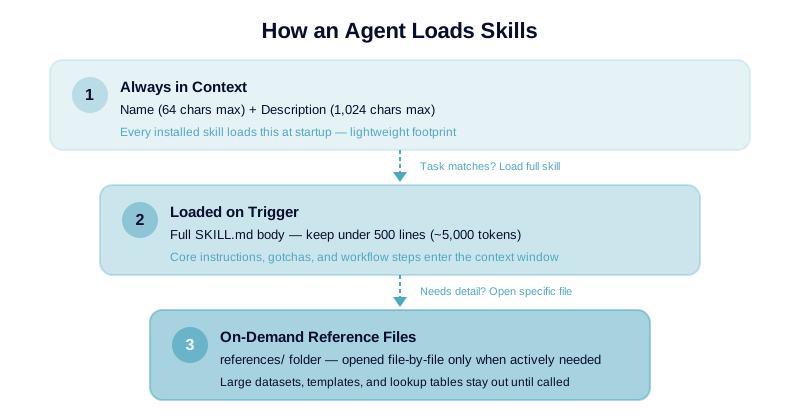
At startup, an agent cannot read all of your installed skills at once without completely clogging its context window. Instead, it only reads each skill’s name (limited to 64 characters) and description (limited to 1,024 characters) to decide which tool is right for the job.
- The Trap: Writing vague descriptions like “generates compliance reports”.
- The Fix: Write exactly what the skill does and when the agent should trigger it (e.g., “Generates the monthly compliance report from internal data. Use when someone asks for the compliance report or monthly filing.”).
- Pro Tip: Write “pushy” descriptions. Models naturally tend to under-trigger and skip skills they actually need, so it’s safer to slightly oversell the utility in the description.
2. Build from Real, Hard-Won Expertise (Not “AI Slop”)
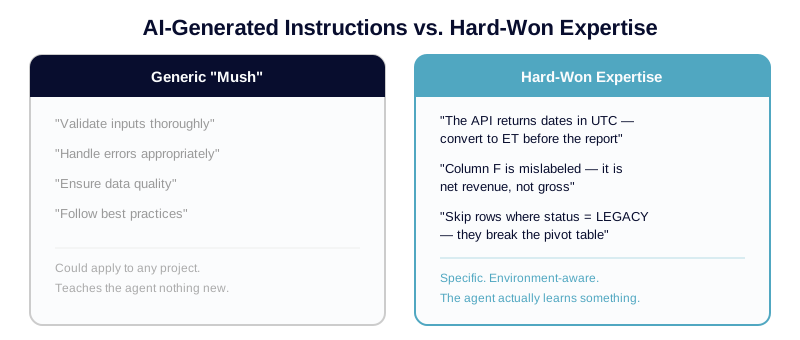
The most common mistake is asking an LLM to write the skill instructions for you. This just gets you generic, low-value advice like “validate inputs” or “handle errors appropriately”. The entire point of an agent skill is to teach the AI your specific, non-obvious way of doing a job.
- How to do it: Walk through the task manually first and write down what actually worked. Synthesize this from real-world artifacts you already own, such as old reports, runbooks, code review comments, or PR feedback.
- Write a “Gotchas” Section: This is the most valuable part of any skill. Whenever you have to correct your AI agent by hand, write that correction down as an environment-specific “gotcha”. Otherwise, you’ll find yourself making the exact same manual correction week after week. As developer Simon Willison puts it: “Keep the domain expertise and let the agent do the routine part.”
3. Spend Your Context Window Wisely
When a skill is triggered, its entire body is pulled into the active context window, competing with other data for the model’s limited attention. Bloated instruction files get expensive and degrade performance.
- The Golden Rule: Keep your
skill.mdbody under 500 lines of text (roughly 5,000 tokens). - Don’t explain the obvious: The underlying model is already smart. It already knows what a PDF is or how a database migration works; only document what it doesn’t know on its own.
- Use Progressive Disclosure: If you have massive reference materials, don’t dump them into the main file. Create a sub-folder called
references/. The agent will only open these specific files when it actively needs them, keeping the main startup footprint lean.
4. Take the Guesswork Out of the Loop with Deterministic Scripts
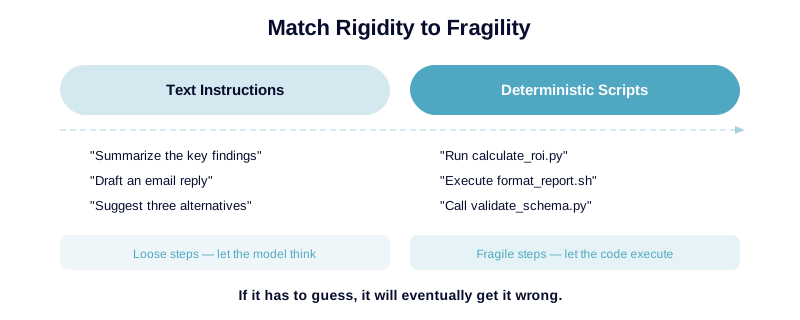
If a step in your workflow is fragile—such as a complex math calculation or a strict file-formatting rule—do not let the model improvise. If it has to guess, it will eventually get it wrong.
- Match rigidity to fragility: For loose steps, write text instructions. For fragile steps, write code.
- Use the scripts/ folder: Place precise, executable code (like a Python or bash script) in a
scripts/directory. - Be explicit: In your skill body, tell the agent exactly to “run this script”. This saves tokens and shifts the agent from a risky, probabilistic guesser into a highly reliable, deterministic executor.
5. Treat Strangers’ Skills Like Untrusted Code
Because skills are an open standard (managed at agentskills.io), it’s incredibly easy to download and run pre-made skills from the internet. But beware: a skill isn’t just text—it can run local scripts, modify your file system, and access your private API keys.
- The Security Reality: A recent security audit scanning nearly 4,000 public agent skills found that over 35% contained security flaws, and 13% had critical vulnerabilities like prompt injections or straight-up malware.
- The Rule: Treat any external skill exactly like a code dependency. Never run a stranger’s skill without auditing what it actually does and checking exactly what external networks or files it attempts to reach.
By taking the guesses out of your AI workflows, you transform your agents from unpredictable novelties into dependable, expert members of your team.
I’ve burned enough hours on agents that almost-work to know this: the skill file is only as good as the real expertise you put into it. No template fixes that. No best-practice checklist replaces the gotchas you’ve earned the hard way.
If you’re building agent skills and hitting walls, I’d genuinely love to hear what you’re building or what tripped you up, drop a line in the comments below!